<?xml version="1.0" encoding="utf-8"?><feed xmlns="http://www.w3.org/2005/Atom" ><generator uri="https://jekyllrb.com/" version="3.10.0">Jekyll</generator><link href="https://m040601.github.io/feed.xml" rel="self" type="application/atom+xml" /><link href="https://m040601.github.io/" rel="alternate" type="text/html" /><updated>2025-02-27T09:58:32+00:00</updated><id>https://m040601.github.io/feed.xml</id><title type="html">Your Name</title><subtitle>Developer (desc in _config.yml jekyll)</subtitle><entry><title type="html">Your Filename19</title><link href="https://m040601.github.io/your-filename19/" rel="alternate" type="text/html" title="Your Filename19" /><published>2024-01-19T00:00:00+00:00</published><updated>2024-01-19T00:00:00+00:00</updated><id>https://m040601.github.io/your-filename19</id><content type="html" xml:base="https://m040601.github.io/your-filename19/"><![CDATA[<h2 id="a-new-post-in-19-jan24-xxxx-xx-xx-your-filenamemd">A New Post in 19 jan24 (xxxx-xx-xx-your-filename.md)</h2>

<p>2024-01-22</p>

<p>Enter text in <a href="http://daringfireball.net/projects/markdown/">Markdown</a>. Use the
toolbar above, or click the <strong>?</strong> button for formatting help.</p>]]></content><author><name></name></author><summary type="html"><![CDATA[A New Post in 19 jan24 (xxxx-xx-xx-your-filename.md)]]></summary></entry><entry><title type="html">Your Filename18</title><link href="https://m040601.github.io/your-filename18/" rel="alternate" type="text/html" title="Your Filename18" /><published>2024-01-18T00:00:00+00:00</published><updated>2024-01-18T00:00:00+00:00</updated><id>https://m040601.github.io/your-filename18</id><content type="html" xml:base="https://m040601.github.io/your-filename18/"><![CDATA[<h2 id="a-new-post-in-18-jan24-xxxx-xx-xx-your-filenamemd">A New Post in 18 jan24 (xxxx-xx-xx-your-filename.md)</h2>

<p>2024-01-22</p>

<p>Enter text in <a href="http://daringfireball.net/projects/markdown/">Markdown</a>. Use the
toolbar above, or click the <strong>?</strong> button for formatting help.</p>]]></content><author><name></name></author><summary type="html"><![CDATA[A New Post in 18 jan24 (xxxx-xx-xx-your-filename.md)]]></summary></entry><entry><title type="html">hoW this jeKYLL thing WorkZZZ!</title><link href="https://m040601.github.io/Hello-World/" rel="alternate" type="text/html" title="hoW this jeKYLL thing WorkZZZ!" /><published>2018-03-03T00:00:00+00:00</published><updated>2018-03-03T00:00:00+00:00</updated><id>https://m040601.github.io/Hello-World</id><content type="html" xml:base="https://m040601.github.io/Hello-World/"><![CDATA[<h1 id="update-the-site">update the site</h1>

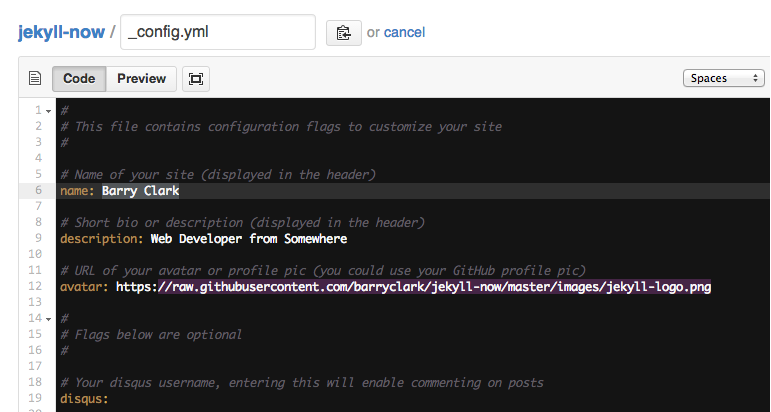
<p>you can update your site name, avatar and other options using the _config.yml file in the root of your repository (shown below).</p>

<p><img src="/images/config.png" alt="_config.yml" /></p>

<p>The easiest way to make your first post is to edit this one. Go into /_posts/ and update the Hello World markdown file. For more instructions head over to the <a href="https://github.com/barryclark/jekyll-now">Jekyll Now repository</a> on GitHub.</p>

<h1 id="how-to-files">how to files</h1>
<p>Assuming you have your gallery images in a structure like</p>

<div class="language-plaintext highlighter-rouge"><div class="highlight"><pre class="highlight"><code>-img
  -gallery
    -image1.png
    -image2.png
    
etc.
</code></pre></div></div>

<p>you can access ‘img/gallery’ them in a collection or page like this:</p>

<div class="language-plaintext highlighter-rouge"><div class="highlight"><pre class="highlight"><code>  &lt;p&gt;/img/gallery/chicken_PNG2174.png - 2025-02-27 09:58:30 +0000&lt;/p&gt;
  &lt;img src="/img/gallery/chicken_PNG2174.png"&gt;


  &lt;p&gt;/img/gallery/febra.jpg - 2025-02-27 09:58:30 +0000&lt;/p&gt;
  &lt;img src="/img/gallery/febra.jpg"&gt;


  &lt;p&gt;/img/gallery/img1.png - 2025-02-27 09:58:30 +0000&lt;/p&gt;
  &lt;img src="/img/gallery/img1.png"&gt;
</code></pre></div></div>

<p>Start images:</p>

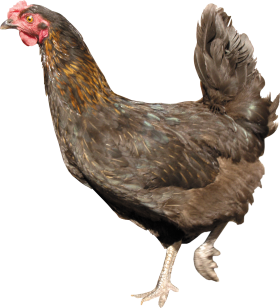
<p>/img/gallery/chicken_PNG2174.png - 2025-02-27 09:58:30 +0000</p>
<p><img src="/img/gallery/chicken_PNG2174.png" /></p>

<p>/img/gallery/febra.jpg - 2025-02-27 09:58:30 +0000</p>
<p><img src="/img/gallery/febra.jpg" /></p>

<p>/img/gallery/img1.png - 2025-02-27 09:58:30 +0000</p>
<p><img src="/img/gallery/img1.png" /></p>

<p>Stop images:</p>

<p>This goes through all static files and check for a certain path (img/gallery in this example).</p>

<p>Than you can access the static file metadata for that file. (I named it ‘image’ in this example but you can name it whatever you want after the for keyword).</p>

<p>I think it doesn’t make too much sense to put something like this in a blog post but rather in a page or a collection.</p>]]></content><author><name></name></author><summary type="html"><![CDATA[update the site]]></summary></entry><entry><title type="html">Your Filename17</title><link href="https://m040601.github.io/your-filename17/" rel="alternate" type="text/html" title="Your Filename17" /><published>2017-01-11T00:00:00+00:00</published><updated>2017-01-11T00:00:00+00:00</updated><id>https://m040601.github.io/your-filename17</id><content type="html" xml:base="https://m040601.github.io/your-filename17/"><![CDATA[<h2 id="a-new-post">A New Post</h2>

<p>onetuon uone
onu noteh uo
oeuoe</p>

<p>Enter text in <a href="http://daringfireball.net/projects/markdown/">Markdown</a>. Use the toolbar above, or click the <strong>?</strong> button for formatting help.</p>]]></content><author><name></name></author><summary type="html"><![CDATA[A New Post]]></summary></entry></feed>